

Last time, I wrote about the overall story of “handing over insurance agency administrative tasks to Claude Code.”
Starting from this post, I will go into the details one by one.
First, the very first thing I built: creating fire insurance quotes.
Introduction
When a partner real estate company acquires a property, a request for a quote arrives in the group chat for each branch. Attached is a PDF of the real estate registry. The body of the message includes the requested start date (usually “as soon as possible”) and occasionally a specified payment method.
My job is to take this, create a PDF quote, and send it back to the chat.
Now, my only job is to “look at the request and ask Claude Code to ‘create a quote for this request’.”
Once the PDF quote is ready, it asks, “Would you like to send it to the chat?” I check the contents and press send.
The disconnect in the field: The decision-making is rule-based, but the input is from scratch every time
In reality, there aren’t that many things to decide for a fire insurance quote.
-
Start date and end date
-
Structure classification (based on the structure in the registry)
-
Building type (entire building or a specific unit in a condominium)
-
Appraised value and insurance amount
-
Payment method
In my case, the patterns for the partner’s properties are fixed, so these are almost entirely rule-based. If it’s “as soon as possible,” it’s two days after the request date, and the expiration is the same day one year later. If no payment method is specified, it’s a 12-installment direct debit. The appraised value is the lower end of the range.
In other words, the thinking part is finished in the first few dozen seconds.
Yet, the input into the non-life insurance system is from scratch every time. I select the calculation category on the start screen, enter the insurance type, location, date, and sub-code, then go through the building information tab, appraised value calculation, contract plan tab, policyholder import, insurance period and payment method, and administrative processing items.
Even though it’s rule-based, the time spent manually inputting it doesn’t decrease. That was the disconnect I felt.
What I built: Reading the request, entering it into the non-life insurance system, and saving the PDF
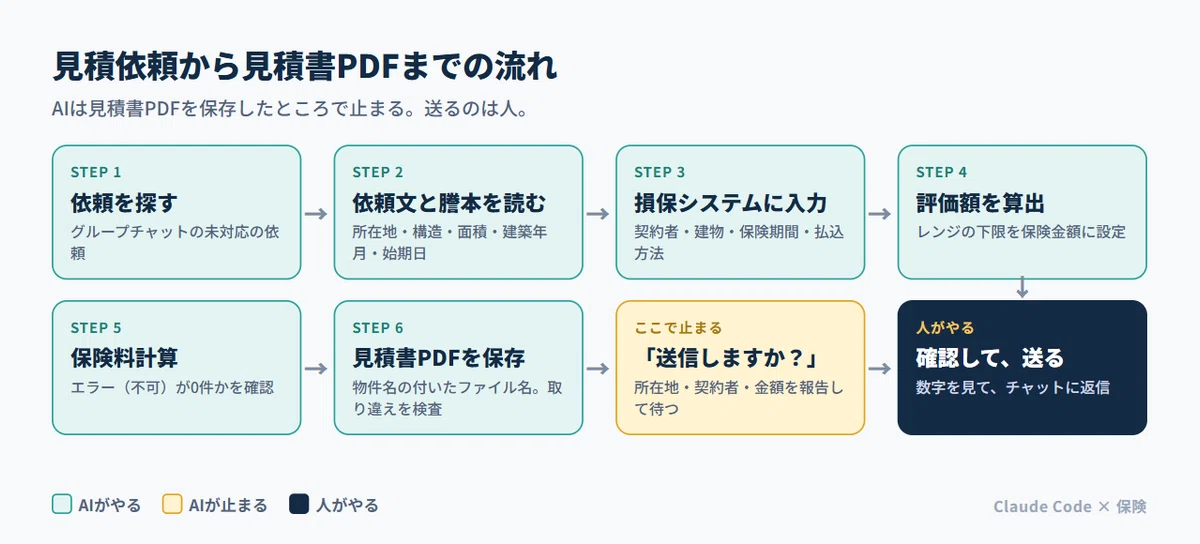
The flow is as follows.
Search for unhandled requests in the group chat
↓
Extract the location, structure, area, construction date, and start date from the request text and the registry PDF
↓
Automate browser operations to input data into each tab of the insurance company system
↓
Calculate the valuation and set the lower limit of the range as the insurance amount
↓
Calculate insurance premiums → Confirm that there are 0 errors (failures)
↓
Issue the quote, retrieve the PDF, and save it with a filename that includes the property name
↓
Pause at “Do you want to send it to the chat?”
I am using VS Code, Claude Code, and a mechanism to automate browser operations (Playwright). The chat is read via a Model Context Protocol (MCP) tool.
The rules are written in the business rules file.
The criteria for input decisions are all summarized in a file called CLAUDE.md. Claude Code reads this every time before starting work.
For example, the structural grade is written as “Wooden -> Grade 3,” “Heavy steel frame -> Grade 2,” “Lightweight steel frame -> Grade 3 (do not make it the same as heavy steel frame),” and “RC structure -> Grade 1.”
Rules that only apply to my business partners, such as “Even if the owner’s name on the registry is different from the business partner, you may use the business partner as the policyholder (because registries before transfer registration are often circulated for properties before purchase),” are also included here.
Stumbling blocks: Entering valuation amounts and reusing quotes
It wasn’t smooth sailing from the start.
1. Accidentally using the calculated valuation as the insurance amount
When calculating the valuation, a range from a maximum to a minimum is provided. My rule is to “use the minimum as the insurance amount.”
However, there were times when I issued a quote by entering the median of the calculation results into the valuation field without changing the “setting criteria.” I realized this for two cases later and had to redo them.
The cause was that the correct way to enter it was a four-point set. Set the criteria to “new value,” leave the valuation field blank, leave the agreed insurance ratio field blank, and enter the minimum directly into the insurance amount field. If even one is different, it either errors out or goes through with the wrong numbers.
Now, I have written this four-point set in my rules file along with the date I made the mistake.
2. The quote PDF URL was the same as the previous property
When a quote is issued, a PDF URL opens. However, this URL is sometimes reused within the same operation, leading to situations where the URL is the same but the content is for a different property.
Now, I compare the hash value of the saved PDF with the previous one, and if they are the same, I judge it as a “reuse” and fetch it again. It’s a simple measure, but it prevents the accident of sending a quote for the wrong property.
3. Entered values disappear when switching tabs
In the non-life insurance system, when moving from the contract plan or payment method tab to the address tab and back, the values sometimes remain and sometimes disappear.
The countermeasure is to “take a screenshot of the screen and check all items before the final insurance premium calculation.” If they are gone, re-enter them. Since this is tedious for humans, it is a check well-suited for AI.
4. There is an “Application Form” button next to the “Quote” button
There are multiple buttons with similar names in the footer, and on very rare occasions, I would accidentally press the “Application Form” button next to it.
Fortunately, the application form just stops with an error if required fields are missing, so no actual application is made. Still, it’s nerve-wracking. Now, I have specified that it should only press buttons where the text matches exactly.
What remains for humans: AI reads, humans send
It is possible to automatically reply to the chat with the quote PDF as is.
However, I do not do that.
There are two reasons for this.
One reason is that I want to be the last person to see the numbers on the quote. As with the valuation issue, “mistakes that slip through” can happen. I spend one minute checking the numbers, the location, and the policyholder’s name before sending it.
Another reason is that there are circumstances not written in the request. “I’ve provided a quote for this property before” or “This branch has different preferences for payment methods than usual.” I, as the one reading the chat, possess this context.
Let AI “create the quote,” and let humans “send it.”
I intend to keep this line drawn as it is.
Conclusion
For fire insurance quotes, the “time spent inputting” was overwhelmingly longer than the “time spent thinking.”
As a result of handing that input work over to AI, what remains for me are three tasks: “reading the request,” “verifying the numbers,” and “sending.” I believe these are all tasks that should be done by a human.
Next time, I will write about the process following the quote: designing “contract preparation” after the application form is created so that “only the send button is pressed by a human.”contract preparation to be a process where “only the send button is pressed by a human.”
For those who want to use the system itself
I have compiled the rules for “where to stop” and “not making assumptions” written in this series, along with 30 request templates, into an implementation kit for insurance agencies. It does not contain programs. It can be used by agencies using any insurance company’s system.
▼ Claude Code Implementation Kit for Insurance Agencies (Rule Ledger + 30 Request Templates)
https://brain-market.com/u/hokenclaude/a/b5MTNzcjMgoTZsNWa0JXY
About this series
This series is compiled in the magazine [Claude Code x Insurance] Record of Automation for Insurance Agents.
https://note.com/hokenclaude/m/m59678c02bbab
#AI #GenerativeAI #AIUtilization #Claude #ClaudeCode #AIAgent #OperationalEfficiency #BusinessAutomation #BusinessImprovement #DX #InHouseDevelopment #InternalTools #NoCode #WorkStyle #Insurance #NonLifeInsurance #FireInsurance #InsuranceAgent #Agent #InsuranceIndustry #InsurTech #Quote #BrowserAutomation #Playwright #AdministrativeWork