


AI trading bots are no longer used only by professional quant teams. In 2026, traders are using automated tools to monitor markets, test strategies, execute orders, manage risk, and reduce emotional decision-making across crypto, forex, and stock trading.
The best all-in-one AI trading bot platform is not simply the one with the most features. It should match how you actually trade. Some platforms are fully managed and beginner-friendly. Some require broker or exchange connections. Others are built for developers who want to code, backtest, and deploy advanced strategies.
This guide reviews seven leading AI trading bot platforms for 2026, with a focus on automation quality, supported markets, ease of use, free access, and real-world trading workflow.
How to Use AI Trading Bots to Earn from Crypto, Forex, and Stock Trading
Using an AI trading bot does not mean profits are automatic. The smarter approach is to use automation to improve consistency, timing, and discipline.
In crypto trading, bots can monitor the market 24/7, which is important because crypto never closes. In forex trading, bots can react quickly to currency price movements across major trading sessions. In stock trading, AI tools can help scan large numbers of stocks, identify setups, and execute rules without emotional hesitation.
The key to earning potential is choosing the right AI trading tool. A weak platform can create more risk than value, while a well-designed platform can help users automate a clearer trading process.
A useful AI trading bot should help with at least four things:
- Market monitoring
- Strategy execution
- Risk control
- Performance tracking
For beginners, a fully managed or no-code platform is usually easier. For advanced traders, platforms with APIs, backtesting, and custom strategy development may offer more flexibility.
2026 Top 7 Best All-in-One AI Trading Bot Platforms
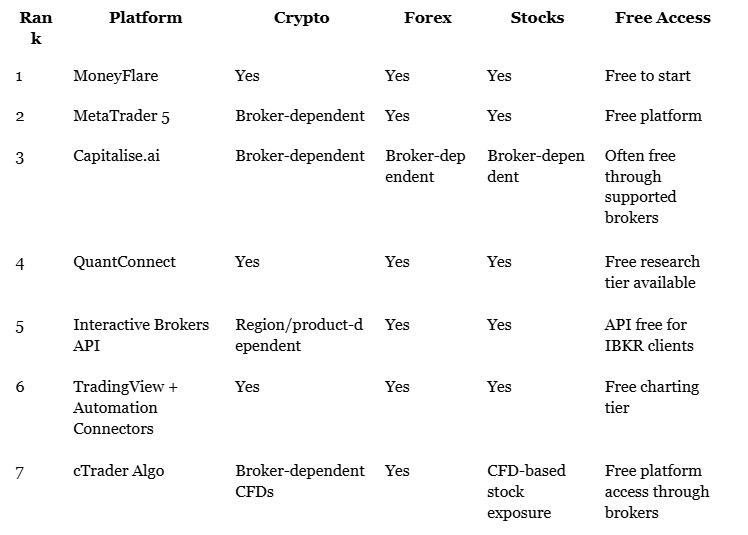
1. MoneyFlare — Best for Fully Managed AI Trading Automation
MoneyFlare is designed for users who want a simpler way to enter AI-powered automated trading without building strategies manually.
Its main appeal is a fully managed workflow: users register, choose an AI trading plan, and let the platform handle automated strategy execution. MoneyFlare positions itself as a fully automated AI trading platform built for easier market participation across crypto, forex, and stock trading, with no programming required.
Unlike technical platforms that require coding, chart setup, broker APIs, or manual signal management, MoneyFlare focuses on hands-off automation. This makes it especially relevant for beginners who want exposure to AI trading but do not want to spend weeks learning strategy scripting.
Visit and register to receive a free $10 real reward and $50 trial credit!
Main Advantages
MoneyFlare’s biggest advantage is simplicity. It is built around automated execution, beginner-friendly onboarding, and reduced manual involvement.
The platform is positioned for users who want AI plus managed trading support rather than a do-it-yourself trading terminal.
It is also useful for traders who want a more passive workflow. Instead of constantly watching charts, users can activate a trading plan and monitor account updates.
Supported Trading Scenarios
MoneyFlare supports multiple AI trading scenarios, including:
- AI crypto trading
- AI forex trading
- AI stock trading
- Automated quantitative trading
- 24/7 automated market participation
- Beginner-friendly managed trading workflows
This makes it suitable for users who want one AI trading bot platform for different market opportunities instead of managing several separate tools.
Is It Free?
MoneyFlare is free to start. Some promotional materials may mention trial credit or beginner rewards, but users should always confirm current terms directly on the platform before making trading decisions.
Operation Guide
Using MoneyFlare is simple:
- Register an account.
- Choose an AI trading plan.
- Activate automated trading and monitor daily results.
No coding, exchange API setup, or manual signal execution is required.
2. MetaTrader 5 — Best for Forex, Stocks, Futures, CFDs, and Trading Robots
MetaTrader 5 remains one of the most widely used platforms for automated trading. It is a multi-asset platform designed for forex, stocks, futures, and other exchange or OTC instruments, depending on the broker. MT5 also supports algorithmic trading through Expert Advisors, custom indicators, strategy testing, and copy trading.
MetaTrader 5 is not a fully managed AI trading bot by itself. Instead, it is a powerful trading environment where users can run automated strategies through supported brokers.
Main Advantages
MetaTrader 5 offers strong charting, strategy testing, algorithmic trading, copy trading, and multi-asset access. It is especially strong in forex trading and is widely supported by brokers around the world.
Another advantage is flexibility. Beginners can use existing Expert Advisors, while advanced users can build their own trading systems using MQL5. MT5 also allows users to download, rent, purchase, or create trading robots through its ecosystem.
Supported Trading Scenarios
MT5 can support:
- Forex trading
- Stock trading
- Futures trading
- CFD trading
- Broker-dependent crypto or crypto CFD trading
- Custom trading robot development
Crypto availability depends heavily on the broker. MT5 itself is the trading platform, while tradable assets are determined by the broker connected to it.
Is It Free?
The MetaTrader 5 platform is free to download and use. However, broker fees, spreads, commissions, paid robots, VPS services, and trading conditions may apply.
Operation Guide
To use MT5 for automation, users usually need to:
- Open an account with an MT5-supported broker.
- Install MT5 on desktop, web, or mobile.
- Choose, buy, rent, download, or build an Expert Advisor.
- Backtest the robot.
- Run it on a live or demo account.
Coding is optional if you use existing robots, but required if you want to build custom strategies.
3. Capitalise.ai — Best No-Code AI Trading Automation Platform
Capitalise.ai is a strong choice for traders who want to automate strategies without writing code.
Its main feature is natural-language strategy creation. Users can describe a trading idea in plain English, test it, and automate execution through supported broker integrations. Capitalise.ai describes itself as a code-free trading automation platform built for users who want to create and run strategies without programming knowledge.
This makes Capitalise.ai useful for traders who understand market logic but do not want to learn programming.
Main Advantages
The platform’s biggest advantage is code-free automation. Traders can create strategies based on price, indicators, time conditions, risk rules, or TradingView alerts.
It is also beginner-friendly compared with developer-focused platforms. Instead of writing Python, C#, or MQL5, users can describe what they want the strategy to do using free-style text.
Supported Trading Scenarios
Capitalise.ai can support different markets depending on the connected broker, including:
- Forex trading
- Stocks or equities
- Indices
- Commodities
- Crypto or crypto-related instruments, depending on broker support
Its actual market coverage depends on the broker used with the platform. Capitalise.ai should be described as a no-code automation layer, not as a standalone broker or exchange.
Is It Free?
Capitalise.ai is often available free through supported broker partnerships, but access depends on the broker relationship and account type.
Operation Guide
To use Capitalise.ai, users usually need to:
- Open or connect a supported broker account.
- Create a trading strategy using natural language.
- Backtest or simulate the strategy.
- Activate automation.
- Monitor performance and adjust rules.
No programming is required, but users still need to understand their strategy logic.
4. QuantConnect — Best for Advanced AI Quant Trading
QuantConnect is one of the strongest platforms for serious algorithmic and quantitative trading. Its LEAN engine supports multiple asset classes, including equities, equity options, index options, futures, future options, forex, crypto, crypto futures, and CFDs.
This is not the easiest platform for beginners, but it is one of the most powerful options for traders who want to build real AI or quant strategies.
Main Advantages
QuantConnect’s biggest advantage is institutional-style research. Users can build, test, optimize, and deploy strategies using a professional quantitative workflow.
It is also suitable for multi-asset portfolio modeling. Traders can test how strategies behave across crypto, forex, stocks, futures, and options before going live.
Supported Trading Scenarios
QuantConnect can support:
- Crypto trading
- Crypto futures
- Forex trading
- Stock trading
- Equity options
- Index options
- Futures
- Future options
- CFDs
- Multi-asset portfolio strategies
Live trading availability depends on supported brokerages. Different brokerages may support different asset classes, so users should confirm available markets before deployment.
Is It Free?
QuantConnect offers free access for research and learning, but live trading, data, cloud resources, and advanced features may require paid plans.
Operation Guide
To use QuantConnect, users usually need to:
- Create a QuantConnect account.
- Write strategies using Python or C#.
- Backtest strategies with historical data.
- Connect a supported brokerage.
- Deploy the algorithm for paper or live trading.
Programming knowledge is usually required.
5. Interactive Brokers API — Best for Global Multi-Asset Automated Execution
Interactive Brokers is not a simple AI trading bot, but it is one of the most important infrastructures for multi-asset automated trading.
IBKR provides global market access across stocks, options, futures, currencies, bonds, and funds from a unified platform. Its API solutions allow users to build custom trading applications, connect workflows, and trade through an IBKR account.
For traders who want to build or connect AI trading systems, the Interactive Brokers API can serve as the execution layer. It is especially useful for advanced users who want broad market access instead of a single-asset bot.
Main Advantages
The main advantage is global market coverage. IBKR is suitable for traders who want automated strategies across stocks, forex, options, futures, ETFs, bonds, and other assets.
It also works well with third-party automation platforms, including QuantConnect and Capitalise.ai, making it a flexible choice for traders who want professional-grade execution.
Supported Trading Scenarios
Interactive Brokers is strongest for:
- Stocks
- ETFs
- Options
- Futures
- Bonds
- Forex / currencies
- Professional multi-asset execution
Crypto access depends on region, account eligibility, and product availability. For accuracy, IBKR should be described as a multi-asset brokerage and API infrastructure, not as a dedicated crypto trading bot.
Is It Free?
The IBKR Trading API is available to IBKR clients free of cost, but trading fees, commissions, market data subscriptions, and account-related costs may apply.
Operation Guide
To use Interactive Brokers for automated trading, users usually need to:
- Open an IBKR account.
- Enable API access or connect a supported third-party platform.
- Build or connect a strategy engine.
- Test execution in paper trading.
- Deploy live with strict risk controls.
Programming is usually required unless using a third-party no-code automation tool.
6. TradingView + Automation Connectors — Best for Signals, Alerts, and Flexible Market Monitoring
TradingView is one of the most popular charting and market analysis platforms for stocks, crypto, forex, futures, indices, and more.
It supports alerts based on prices, indicators, drawing tools, and strategy conditions. TradingView can also send webhook alerts to external applications when an alert is triggered, making it useful for automation workflows.
TradingView itself is not a fully managed AI trading bot and does not automatically execute every strategy by default. However, when combined with automation connectors such as webhooks or platforms like TradersPost, it can become part of an automated trading workflow. This is useful for traders who want to convert chart alerts into order execution.
Main Advantages
TradingView’s biggest advantage is market coverage and signal flexibility. Traders can monitor almost any major asset class and create alerts from technical conditions.
It is especially useful for users who want to design their own signal logic and then connect those alerts to external automation tools.
Supported Trading Scenarios
TradingView supports analysis for:
- Stocks
- Crypto
- Forex
- Futures
- Indices
- Other major market instruments
Automation depends on broker support, webhook setup, and third-party connectors. TradingView should be described as a charting, analysis, and alert platform that can support automation, not as a standalone fully automated trading bot.
Is It Free?
TradingView has a free plan, but advanced alerts, multiple charts, strategy tools, and higher usage limits usually require paid plans. Third-party automation tools may also charge fees.
Operation Guide
To use TradingView for automation, users usually need to:
- Create a TradingView account.
- Build chart alerts or strategy alerts.
- Connect alerts to a broker or automation connector.
- Use webhooks if needed.
- Monitor order execution and risk.
Manual setup is required. It is better for signal-based automation than fully managed trading.
7. cTrader Algo — Best for Forex and CFD Algorithmic Trading
cTrader is a strong platform for traders who focus on forex and CFD automation.
cTrader is primarily an FX and CFD trading platform that includes cTrader Algo for algorithmic trading, backtesting, and optimization. Its automation environment supports cBots and indicators, and cTrader’s current documentation describes support for C# and Python-based algorithmic development.
This makes cTrader a practical option for traders who want a modern alternative to MetaTrader-style automation.
Main Advantages
cTrader’s main advantage is its clean algorithmic trading environment. It is especially attractive to forex and CFD traders who want custom bots, cloud execution, and broker-linked automation.
cTrader also supports cloud execution for cBots, allowing users to run algorithms without relying only on a local device or separate VPS setup.
Supported Trading Scenarios
cTrader is strongest for:
- Forex trading
- CFD trading
- Metals
- Energies
- Indices
- ETFs and other broker-supported CFD markets
- Broker-dependent crypto CFDs or stock CFD exposure
cTrader should not be described as a direct stock exchange or spot crypto trading platform in the same way as a brokerage or crypto exchange. Its available instruments depend on the broker and are generally offered through FX/CFD structures.
Is It Free?
cTrader is generally available through supported brokers. Some bots or tools may be free, while others may require purchase or subscription.
Operation Guide
To use cTrader Algo, users usually need to:
- Open an account with a cTrader-supported broker.
- Use cTrader Algo to build or install cBots.
- Test the bot with historical data or demo trading.
- Run the bot locally or through cloud execution.
- Monitor risk and performance.
Some coding knowledge is helpful, especially for custom strategies.
Can AI Trading Bots Achieve Full Automation?
Yes, AI trading bots can achieve full automation in certain workflows, but not every platform offers the same level of automation.
A fully managed platform like MoneyFlare is closer to hands-off automation because users do not need to code, connect complex APIs, or manually execute signals.
Platforms like Capitalise.ai can automate strategies without code, but users still need to create trading rules and connect a broker. Developer platforms like QuantConnect, Interactive Brokers API, and cTrader can be highly automated, but they require more technical setup.
In real trading, full automation should not mean zero supervision. Market conditions change, spreads widen, liquidity disappears, and unexpected news can break a strategy.
The best approach is supervised automation: let the bot execute the system, but review performance, risk, and market conditions regularly.
What Is the Best Strategy for Automated Trading?
The best automated trading strategy is not the one that promises the highest return. It is the one that can survive different market conditions.
For crypto trading, useful strategies often include trend following, volatility breakout, grid-style execution, DCA-based accumulation, and momentum rotation. Since crypto trades 24/7, bots can help capture opportunities outside normal waking hours.
For forex trading, automation works well with rule-based strategies such as session breakout, mean reversion, moving average confirmation, and macro-event risk filters. Forex bots should pay close attention to spreads, leverage, and news volatility.
For stock trading, common automated strategies include momentum screening, earnings-related filters, sector rotation, technical breakout systems, and portfolio rebalancing. Stock bots should also account for market hours, liquidity, and gap risk.
In 2026, the best strategy is usually multi-layered:
- Use AI or automation for scanning
- Use strict rules for execution
- Apply risk controls for position sizing
- Set stop-loss limits
- Monitor drawdown protection
Is AI Quant Trading a Smart Way to Trade?
AI quant trading can be a smart approach when it is used correctly. It helps traders move from emotional guessing to rule-based decision-making.
Instead of chasing every market move, traders can test ideas, measure results, and automate repeatable systems.
However, AI quant trading is not magic. A strategy that works in backtesting may fail in live markets because of slippage, fees, poor liquidity, changing volatility, or overfitting.
This is why platforms with backtesting, paper trading, risk controls, and clear performance tracking are valuable.
For beginners, AI quant trading is smart when it lowers complexity. For advanced users, it is smart when it improves research quality, execution speed, and portfolio discipline.
The real value of AI trading bots in 2026 is not just prediction. It is building a more consistent trading process.
Summary
The best all-in-one AI trading bot platform in 2026 depends on your trading style and skill level.
MoneyFlare is a strong choice for beginners who want fully managed AI trading automation. MetaTrader 5 remains useful for forex and multi-asset robot trading. Capitalise.ai fits users who want no-code automation, while QuantConnect is better for advanced AI quant trading.
Interactive Brokers API supports professional multi-asset execution, TradingView works well for signal-based automation, and cTrader Algo is practical for forex and CFD algorithmic trading.
Overall, the best AI trading bot is not the most complicated one. It is the platform that helps you automate crypto, forex, or stock trading with clear execution, practical risk control, and a workflow you can manage.
In 2026, smarter trading means using AI to improve speed, discipline, and consistency, not to replace judgment completely.